
If you suspect fraud, please contact our fraud hotline at 866-372-8433
Contact Us Today
Protect Your Summer Adventures: 5 Tips for Cybersecurity on the Go
Read More
ShinyHunters Uses Canvas to Paint Its Masterpiece
Read More
Don’t Let Scammers Steal Your Fresh Start: How Fraudsters Target New Graduates Looking for Work
Read More
Don’t Miss the Call on Call-Back Fraud: Understanding TOAD Attacks
Read More
Secure Your New Apple Device: 5 Essential Privacy and Security Settings to Configure Right Now
Read More
Check Out Our Latest Blog Post!
No, you didn’t miss jury duty!

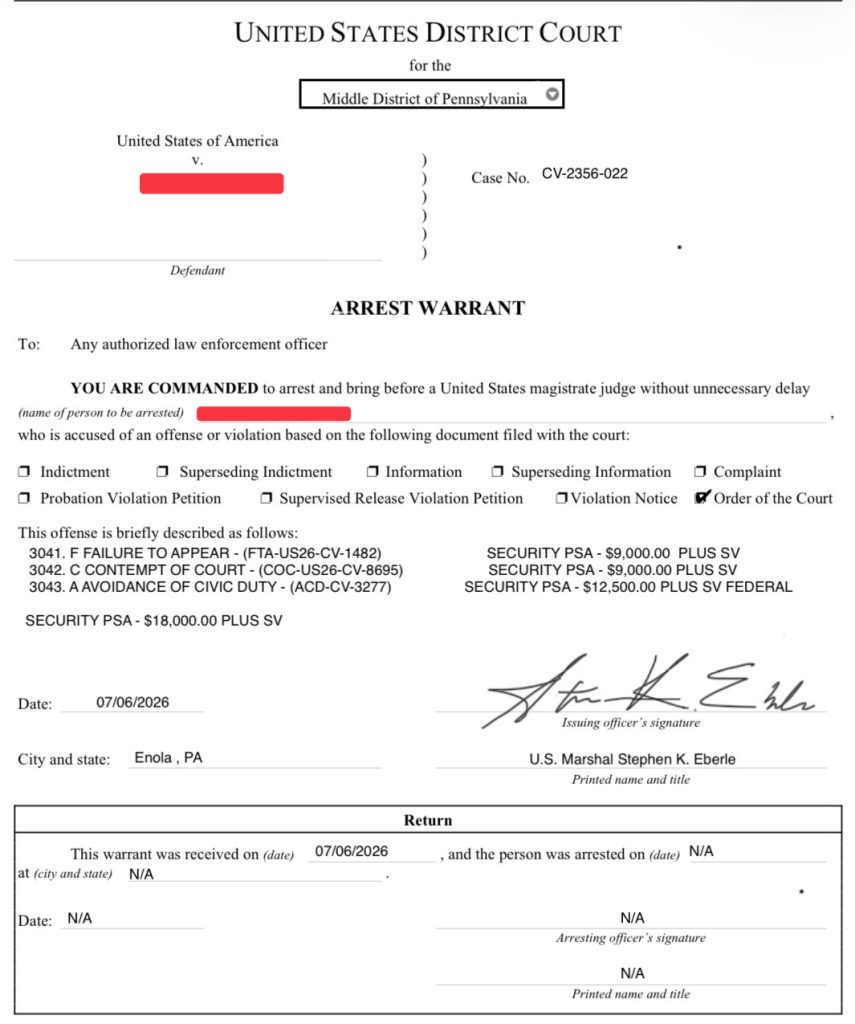
The phone rings and the caller identifies himself as a Deputy U.S. Marshal. He states that you missed jury duty, a judge has issued a warrant for your arrest, and that the only way to avoid being taken into custody is to resolve the matter immediately. Within seconds, a text message arrives with an image of what looks like an official federal warrant.
This is not a hypothetical. It is a real scam, and it is spreading quickly across the country. The following account is based on an actual incident involving a family member of one of our cybersecurity team members, recounted here to illustrate exactly how the scam unfolds and why it works.
 How the Scam Played Out
The target received a call from a local area code. The caller claimed to be a Deputy U.S. Marshal and said that a warrant had been issued for missing jury duty. Almost simultaneously, a text arrived containing an image of a fraudulent arrest warrant.
The caller already knew the target’s name and phone number, and cited an address where the target had lived years earlier. When the target pointed out that the address was outdated, the caller didn’t miss a beat; he simply replied that this must be where the paperwork had gone wrong. It was a small, confident correction, and it was enough to keep the story believable.
The caller then explained that the “fine” was $18,000, but that the judge was willing to be flexible. He asked the target to check their bank balance to see how much could be sent right away. Payment, he said, could be made through Cash App or Zelle.
When the target, who was near a police station at the time, offered to simply walk in and sort the matter out in person, the caller’s tone changed. He became insistent, warned that local police could not be trusted, and pressed harder for immediate payment. That shift was the clearest signal that something was wrong. The target ended the call and contacted a family member with a law enforcement background instead of complying.
Why This Scam Is Effective
What makes this scam dangerous isn’t the fake document. It’s the person on the other end of the line.
These are not the poorly worded, easily dismissed scam attempts of years past. The callers are composed, articulate, and unhurried. They have enough personal information about the target to make the story plausible, and the warrant images they send are convincingly designed to resemble authentic court documents.
The entire interaction is engineered to produce one outcome: panic. Fear short-circuits careful thinking. It replaces “let me verify this” with “how do I make this go away right now?” and that reaction is precisely what the scammer is counting on.
What to Know
- Courts do not call demanding immediate payment to avoid arrest. Legitimate legal processes do not work this way.
- No law enforcement agency accepts fines or bail through Cash App, Zelle, Venmo, gift cards, or cryptocurrency. Any request for payment through these channels is a red flag on its own.
- No legitimate official will ask you to keep the matter secret or avoid contacting local police. Secrecy is a control tactic, not a legal requirement.
- A real warrant is never resolved by sending money through a mobile payment app.
- Caller ID cannot be trusted. Scammers routinely spoof local numbers, including ones that appear to belong to government offices or courthouses.
What to Do If You Receive One of These Calls
- Do not provide personal information.
- Do not send money, in any form.
- Do not click links or open attachments sent to you as “proof.”
- Hang up immediately.
- Verify independently. Contact your local police department, your county clerk of courts, or the court directly, using a phone number you look up yourself rather than one provided by the caller.
If you or someone you know receives a call like this, the safest response is the simplest one: stop, disengage, and verify through channels you control.